#7 - Less Stress with RSS (& Newsreaders)
 You've heard of RSS? You’ve seen these icons (the ones to the right) on your favorite websites? Well, what will they do for you?
RSS stands for “Really Simple Syndication.” It uses XML (the second icon) and allows you to be notified when content on a website has been updated. 
Just think about the websites and news information sources you visit everyday. It takes time to visit those sites and scour the ad-filled and image-heavy pages for the particular text you want to read, doesn’t it? Now imagine if you could visit your favorite information sources and web pages in just one place and all at the same time … without being bombarded with advertising… without having to search for new information on the page you’d already seen or read before… and without having to consume a lot of time visiting each site individually. Would that be valuable to you? Well, it’s available now through a newsreader and RSS.
This week's podcast focuses on the enabling power of RSS and speculates somewhat on its possible future at KCLS.
Click the Play button above
to hear this week's Podcast (2:38)
Rafe Needleman, editor for CNET.com Business Buying Advice, gives an illustrative 3 1/2 minute introduction to RSS feeds, how they work, and how you use them. Take a look: RSS - Feel the Need for Feeds (3:32). You'll need speakers or headphones to watch this - if these aren't available at your location, take a look instead at a similarly-themed text-based tutorial from Palinet (Palinet is an east coast library cooperative).
Whether you watch Rafe's video or check out the Palinet tutorial, you'll see several references to reader software. This software is the key to keeping track of your preferred RSS feeds. For the purposes of participating in KCLS Learning 2.0, we'd like you to use Bloglines. Why? It's easy to use, it's popular, it's feature-rich and it's free...
Now you get to give it a go in today's Discovery Exercise in which you'll set up a Bloglines account and add a bunch of RSS feeds.
- Go to Bloglines (link will open in a new window) and set up your personal account.
- Subscribe to 2 RSS feeds.
How?
First, find the RSS feed. Look for XML or RSS buttons (the same ones you saw at the start of this lesson) on your favorite websites. And it's not just text-heavy sites - even your Flickr photo pages have RSS feeds (look to the bottom of a Flickr page for the feed icon). Click on the icon and select the resulting URL at the top of your web browser - this is what you'll copy then paste into Bloglines. Second, go back to your Bloglines account and click on the 'Add' link in the left side of the screen.
Looking for more visual instructions? Take a look at this excellent tutorial on preetamrai.com. Just keep in mind that some of the bloglines buttons used in the tutorial have changed.
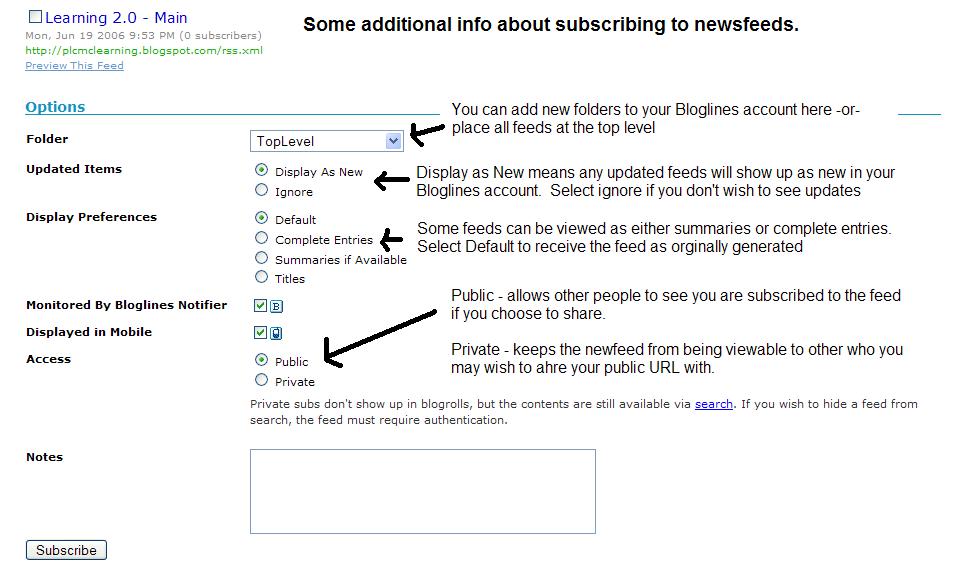
Curious about the various Bloglines check boxes when you add your RSS feed? Take a look at this descriptive screen shot Helene Blowers created for her library's Learning 2.0 program. - Subscribe to at least 2 of the RSS feeds from your co-worker's Learning 2.0 blogs. These blogs are linked from our particpants page. All you'll have to do here is type the blog URL (for example, this blog is http://kcls27things.blogspot.com) into the subscribe field in Bloglines. Try it, it's easy!
Still confused? Never fear - watch this short YouTube video created by our Learning 2.0 guru Helene Blowers . - Make it official - subscribe to the KCLS Learning 2.0 feed via Bloglines. Like in the examples above, paste the blog URL into the subscribe field...
- Subscribe to at least 1 of the following news and/or library-themed feeds:
- Seattle Post Intelligence RSS link (pick one from their list)
- BBC News Front Page World Edition
- Google News - Health Section
- Reader's Club New Review Feeds
- Unshelved Library Cartoon Feed
- National Weather Service - Create a blog post about this exercise. Don’t know what to blog about? Think about these questions:
- What do you like about RSS and newsreaders?
- How do you think you might be able to use this technology in your work or personal life?
- How can libraries use RSS or take advantage of this new technology?
3/16/07 Postscript - Google Reader
A number of you have asked about using Google Reader instead of Bloglines. Feel free - it's another good product and has the added benefit to tying in with the Google account you set up a few weeks ago for Blogger. The only negative is that we will not provide setup instructions - just don't have the time to write these up...
Google Reader is available at www.google.com/reader.
Up next - searching for feeds and discovering those with a library-theme...


11 comments:
Just curious - is there a way to view who is linking to our blog? Or, for example, does the Seattle Times know who is subscribed to their feeds?
aw,
The answer is Yes and No.
Yes, if you have your blog hosted on your own server (meaning you rent web hosting space from some provider or build your own web server and properly connect it to the Internet) then you can use various monitoring and statistical tools to count the traffic that visits your web server and get feed counts that way. Even then, you would have the challenge of separating out browser visits versus feeds.
Otherwise, Bloglines does report the number of people that subscribe to a feed through their online feed aggregator. For example, as of 3:46 p.m. today, 4 people subscribed to KCLS27THINGS via Bloglines.
Just curious if anyone else has run into this problem. I signed up on Bloglines about 1/2 hour ago and I have yet to receive a confirmation e-mail. So, I'm stuck until it arrives. Is this common? Thanks.
I had a similar problem with my original blog - I think the verification email either went to junk mail or I just accidentally deleted it without reading it (thought it was google news) - anyway, you can ask for a validation email to be re-sent to your email address. Go back to bloglines and log in again. There is supposed to be an option for re-sending the validation email after you log in.
Sheesh! It makes me wonder who has the time to read all the stuff it's possible to subscribe to? I remember when listserves were new and completely addictive in the same way - only now we have a choice of self appointed sages and highly paid officially recognized self appointed pages.
Hey, thanks for providing a link to a tutorial full of texty-goodness for the auditorily-learning challenged--!
I really appreciate it.
Hey there, just curious - how come you want us to use Bloglines? I already signed up for Google Reader, which made sense to me (then), as Google is attached to blogger (which you asked us to use to create our blog). Just wonderin'
Transcript of Podcast: Podcast #4 – The enabling power of RSS
David – Hello everyone and welcome to this week’s Learning 2.0 Podcast. This week’s focus is RSS. RSS stands for Really Simple Syndication. It’s a file format that used XML, and that’s a markup language similar to HTML, to regularly deliver updated information over the web. In its native format, RSS doesn’t look like much – you’ll see a long text document full of brackets and tags. Now if you’ve ever looked at the source of a webpage, it’s really similar.
Now the power of RSS comes from what you can do with it. For one, RSS feeds … and we’ll be using that word a lot. RSS feeds can be imbedded in a web page … let’s say a master gardener group had a constantly updated section on their web site with all new gardening books that have been added to the KCLS catalogue. RSS feeds can also be run through a news reader (and that’s software that it’s designed to display the updated information RSS gives you access to.) And that’s what we’ll be focusing on today and this week.
And why would you want to do this? My answer is very simple: Big one … time… (you save a lot of it) ... and convenience. RSS and news readers are enablers – they let you keep track of the information that is important to you without wasting a lot of time. You’ll see new content that has been added and you don’t have to deal with ads and you don’t have to wade through the full page to make sure you didn’t miss something. In my case, I use a new reader to keep track of my favorite library-themed blogs, Flickr accounts of my friends (and that’s right, RSS feeds are not limited to text sights), I get updates from my preferred news sources, my favorite new parents blogs, and a handful of pop-culture themed blogs that I will not bore you with, don’t worry. I never look at the original websites – there’s really no reason to. And because my news reader tells me when new content has been posted, I don’t have to waste time scouring through the website looking for the new content. I know there’s nothing new to read unless my reader tells me there is.
And this is why RSS is a great enabler. You take control of the information you want to see. And imagine this in a work environment … no more all-staff emails. If you have a particular job function, you’d subscribe to the feed or the blog from that staff member or department responsible for keeping you up to date.
Today we take the first step. You’ll set up an account with Bloglines. Bloglines is an excellent and free news reader that you have access through their website: www.bloglines.com And we practice what we preach here at Learning 2.0 – we’ve set up a Blogline’s account to keep track of everyone’s Learning 2.0 participant’s blogs. That’s how we keep sane. Instead of checking back on over 300 blogs, we just look to see when something new has been posted.
That’s all for this week’s podcast. Guest stars, worry not, will return next week when we focus on My Space. Thanks everyone.
I can relate to angliophile's comment. I use gmail regularly and it's the same login for Blogger, but Bloglines is separate, therefore another login. I'm in gmail a lot, so my Personalized Google Home Page opens with my feeds and my gmail embedded in it.
Feel free to use the Google reader instead of Bloglines if you prefer - what's important is that you get comfortable using RSS feeds and not what software you are using. And why did we choose Bloglines as the software we use in the lesson? Habbit and affection - we've used it for some time now and it's quite good...
Wahoo! I finished another lesson and this one is going to be great fun. Books, Food, and Computer Game download information at my fingertips (if I can only find time to check into my account on a regular basis.) FUN FUN FUN!
Post a Comment